Oh my god, let's go to 노래방 🎤
If you're in Korea or planning on going anytime soon, here's some info on how to navigate the room and have a good time!
You can’t talk about Korea without talking about 노래방. It is a core part of the culture in Korea where everyone from 할머니 to little 어린이 go sing in a room together.
It is a fundamentally different thing than karaoke as seen in most of the US where you go to a bar and sing in front of a bunch of strangers. This can be absolutely nerve-racking for people and kind of take the fun out of something that they might enjoy otherwise!
That was true for me (Ian) when Jihye was trying to convince me to go to 노래방 — I absolutely did not want to do it. But I went and ended up loving it!
It was just us and close friends and it was a total blast and super relaxed. In the US, the 노래방 was at a chicken restaurant with extremely thin walls, funnily enough.
But anyways, the whole time whoever was not singing was eating chicken and then the person singing was, well, singing! It was a super relaxed environment and totally broke my perception of what karaoke could be.
So, today we’ll chat more about 노래방, the different kinds and also what most of the buttons do on the laughably large controller that you find in 99% of 노래방!
First, though — I’ve been saying 노래방. This literally means “singing” (노래) “room” (방). You’ll also find signs around for a few different things. For instance:
- 노래연습장 = “singing” (노래) + “practice” (연습) + “place” (장) — you typically rent these rooms by the hour with your friends!
- 코인노래방 = coin 노래방 — these are places where you go in and can sing even a single song if you want! Typically, one coin (500 won, or 50 cents) for one song, as the name suggests. But you can get 10 songs, 30 minutes, 60 minutes, and a bunch of other options depending upon the place. Nowadays these places are pretty much just rooms that you go and pay for electronically without anyone being there!
We definitely recommend anyone that is already in Korea or will be in Korea go check out 노래방! 🎤
Once you’re inside there are a few things to point out!
First, when you get your microphone, make sure to put on the 마이크 커버 (“mic cover”) just to keep it clean, but also to make sure that you don’t accidentally touch a dirty microphone!
Second, you will see, as previously mentioned, a controller with entirely too many buttons. It will look like this:

Let’s break the parts down section by section:

First things first. The most essentials!
시작 means start. Once you've queued a song, this kicks it off.
취소 means cancel. Pressed the wrong song? Hit this.
예약 means reserve — this is how you queue a song. You search for it, then hit 예약 to add it to the lineup. You'll also see 예약확인 (check your reservations), 예약취소 (cancel a reservation), and 우선예약 (priority reserve — jumps your song to the front of the queue).
You see these numbers, because in each room, there is this book with so many songs and their numbers. If you have the number, type that number and press ‘시작’ or ‘예약’ and you are ready to go!
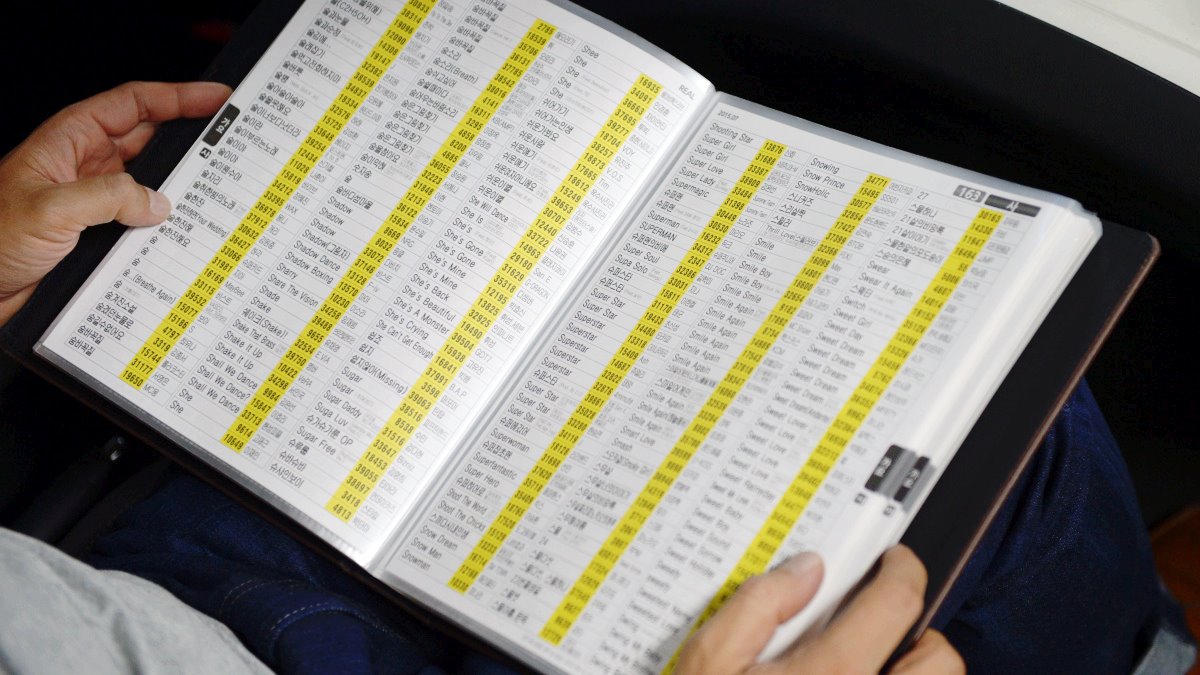
Honestly, the book is a bit of a pain to use and I prefer to just search for songs / artists using the keyboard. So, let’s look at that!

The four yellow buttons at the top of that keyboard section tell you what you're searching by:
제목 — search by song title
가수 — search by singer
가사 — search by lyrics (great when you only remember a line)
국가별 — search by country/language (Korean, English, Japanese, etc.)
Type using the keyboard, then press Enter. The 한/영 button in the bottom-left switches between Korean and English input.
Still didn’t find the song you’d like to sing and need some inspiration?

신곡연습 — New (신) song (곡) practice (연습) mode. Lets you run through recently released songs, usually with extra melody guide support since you might not know them well yet.
신곡안내 — New (신) song (곡) guide (안내). Shows you what songs have recently been added to the machine's library.
인기차트 — The popularity (인기) chart (차트). Real-time rankings of what's being sung most right now across the network.
테마곡 — Theme (테마) songs (곡). This filters songs by theme or category — drama OSTs, movie soundtracks, seasonal songs, and so on.
Typically, 인기차트 is your best bet if you’d like some popular karaoke song recommendations.
Most likely you want to sing instead of listening to the instrumentals. So, if you want to skip all the unnecessary instrumental breaks, or just want to sing half of the song, or skip some parts that you are unsure of, this next set of buttons control skipping, jumping, and modifying the track itself.

간주점프 — Instrumental interlude (간주) skip/jump (점프). If you are on a time limit for your 노래방, this is the best button because it skips the middle parts and lets you get to just the singing parts! Especially useful if there are only 2 minutes left and you want to finish the song and get the next song started before the time is up (because, thankfully, it stops when the last song finishes, not when time is up!)
절 점프 — Skips forward by one verse (절).
1절연주 — Plays only the first verse (1절) of the song, then stops.
마디점프 — Jumps forward or backward in the song. 마디 is a single bar of music in the technical sense.
점수제거 — Remove (제거) score (점수). By default, you’ll receive a score of your singing performance! If you just want to enjoy singing without knowing your score, use this button to turn it off.
On the contrary, if you want even more fine scoring, you can turn on 정밀채점 (detailed scoring)!
영상선택 — Lets you change the background video playing behind the lyrics. Most machines have a few options — nature scenes, cityscapes, abstract visuals, other music videos.

Some other fun buttons here are:
박수 adds clapping (박수) sound effects in the background. I love this button and it really just makes the vibes even better while singing!
리듬변환 — Rhythm (리듬) conversion (변환). This button remixes the same song into a different genre arrangement — techno, disco, EDM, and so on, and can be really fun!
남/여음정 switches the key between a male or female vocal range. If the song is too high or low, use ▲음정 and ▼음정 to raise or lower the pitch manually.
▲템포 / ▼템포 speeds up or slows down the song.
▲멜로디 / ▼멜로디 controls the melody guide volume — the little tune that plays to help you follow along.
▲마이크 / ▼마이크 is your microphone volume.
▲에코 / ▼에코 controls the echo effect on your voice.
▲리버브 / ▼리버브 is similar to echo but controls the reverb (room sound depth).
Enjoy this newsletter?
Subscribe to Daily Tokki Korean Learners to get new posts delivered to your inbox.